
AI driven Smart Filter
Date: 06. 2024, 02-05, 2036
My Role: AI generated prototyping, End-to-end product design
Our product main goal is to help users find what they need quickly. However, as our product catalog grew rapidly as the marketplace, the data in the filter becomes noisy, messy and a lot and thus many users struggle with finding the right product via the filter. To fix this, I led the 'Smart Filter' project.
We used AI to understand what users want, making it much easier for them to find products and buy them.
Project Goal
To simplify the product discovery journey by replacing a complex, multi-step filter system with an intuitive, AI-driven solution that reduces user drop-offs and increases conversions.
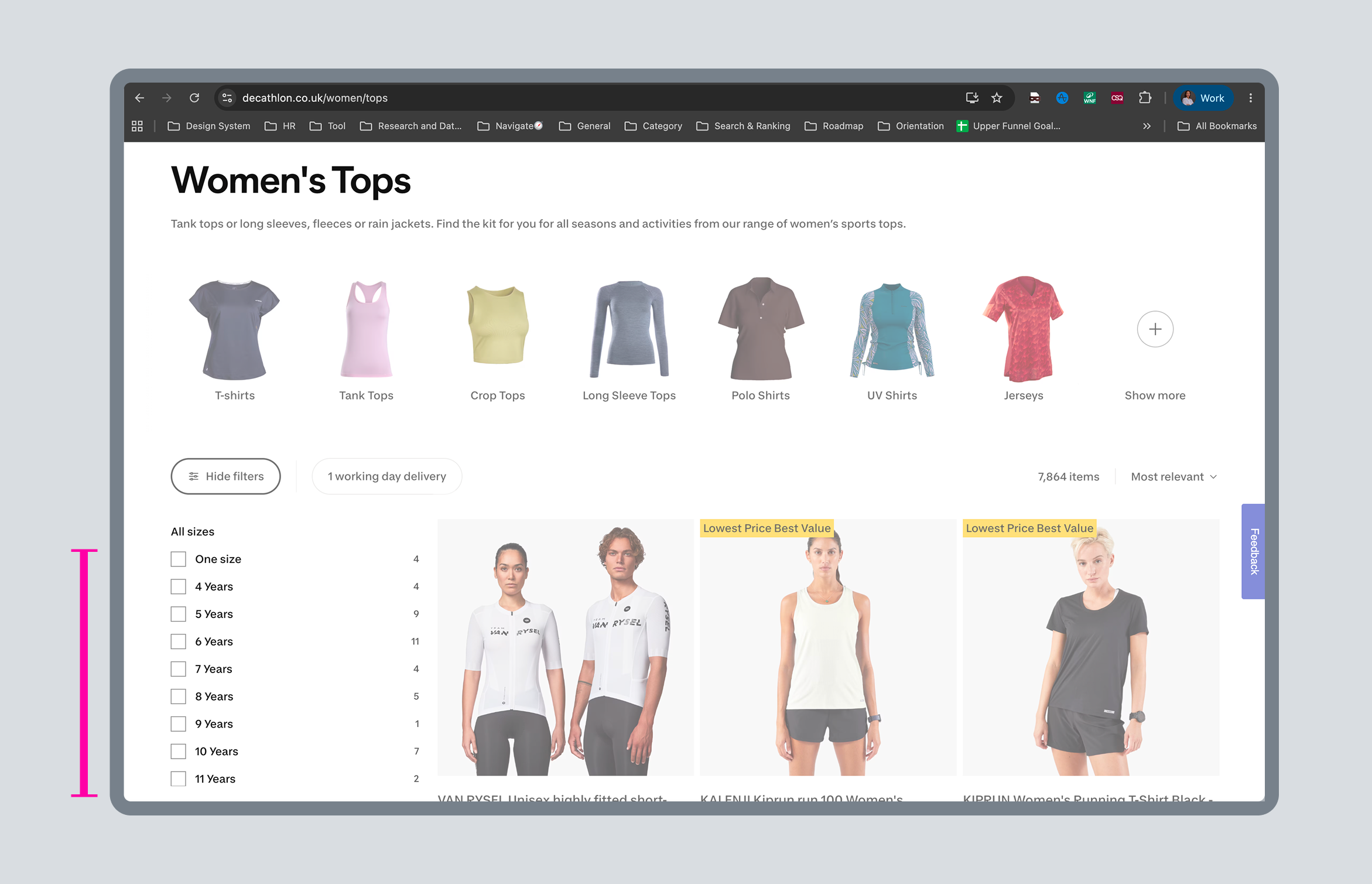
01. User’s Problem:
Data Fragmentation & Filter Inefficiency
01 Invisible High-Performing Filters
With too many category pages and fragmented data, we couldn’t identify which filters had the highest usage and conversion on each specific page.
02 Data Noise
Poor backend mapping exposed irrelevant options. For example, a user browsing "Women's T-Shirts" still saw baby sizes like "3 Months" or "8 Years Old."
03 Design Strategy
Instead of manually analyzing and fixing thousands of pages, we built an AI-driven Smart Filter to automatically detect page context, surface the highest-performing filters, and clear out data noise.
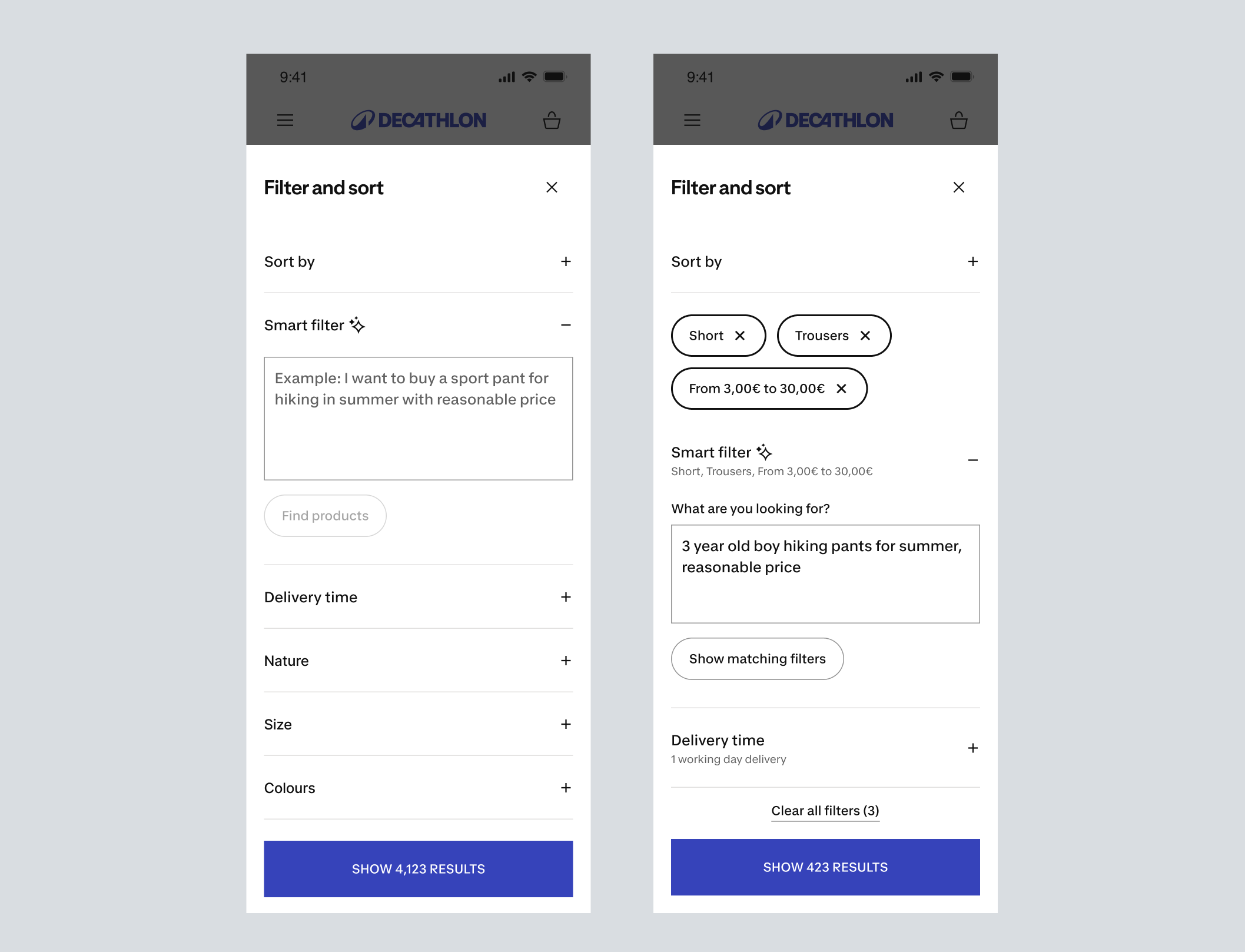
02. The First Draft:
Proving the Concept in 8 Hours
We built the first prototype in just 24 hours during the Decathlon AI Hackathon to test our idea quickly.
Technical Constraints: Because of tight time limits, the initial UI was simple. It just displayed all AI-applied filters and traditional filters together using basic UI chips.
The Result : We won 1st place at the Hackathon. This 1-day MVP instantly proved its value, caught the executives' attention, and successfully secured the budget to build this into a real product.
💬 Executive Leadership Comment: "This isn't just a shiny AI feature; it directly attacks our chronic data mapping issues across categories. Seeing a working prototype solve this in 24 hours proves we need to integrate this into our core product roadmap immediately.
03. Overcoming AI Inaccuracy & Technical Constraints
When we moved this project from a hackathon concept to a real product roadmap, we faced a major question: What if the AI applies the wrong filters and goes completely against user expectations? Nobody knew exactly how accurate Vertex AI would be in our live filter experience.
To solve this, I focused on building a robust "Prompt UX" system to minimize inaccuracy risks. I drew inspiration from a Builder Lab article on designing for different levels of AI precision:
💡 The AI Precision Matrix
99% Precision
Aggressive CTA, “Still want this? Click to confirm or we’ll cancel your order.” When AI is almost certain, use a bold, direct UI.
80% Precision
Medium CTA, “Your order ships tomorrow!” When AI is right 4 out of 5 times, give a clear, easy way out.
40% Precision
Soft CTA, “Your order is on the way!” When AI is wrong more often than right, use a subtle, non-intrusive UI to quietly surface options without pushing hard.
💡Applying the 40% Precision Strategy
Since our filter data was highly volatile and unpredictable, we assumed a conservative 40% precision scenario for the initial phase. Instead of forcing AI-generated filters prominently onto the user, I redesigned the experience using a Soft UI approach:
Soft Recommendations
We quietly surfaced the AI filters as flexible suggestions (chips) rather than hardcoding them as active, locked filters.
Low Risk, High Autonomy
This gave users a meaningful signal over random data while keeping it non-intrusive. If the AI was wrong, the user could simply ignore it or gently dismiss it with zero frustration.
🕹️The Prototype: 40% Precision in Action
To bring the Soft UI approach to life, I designed a real-time predictive interaction:
How it works
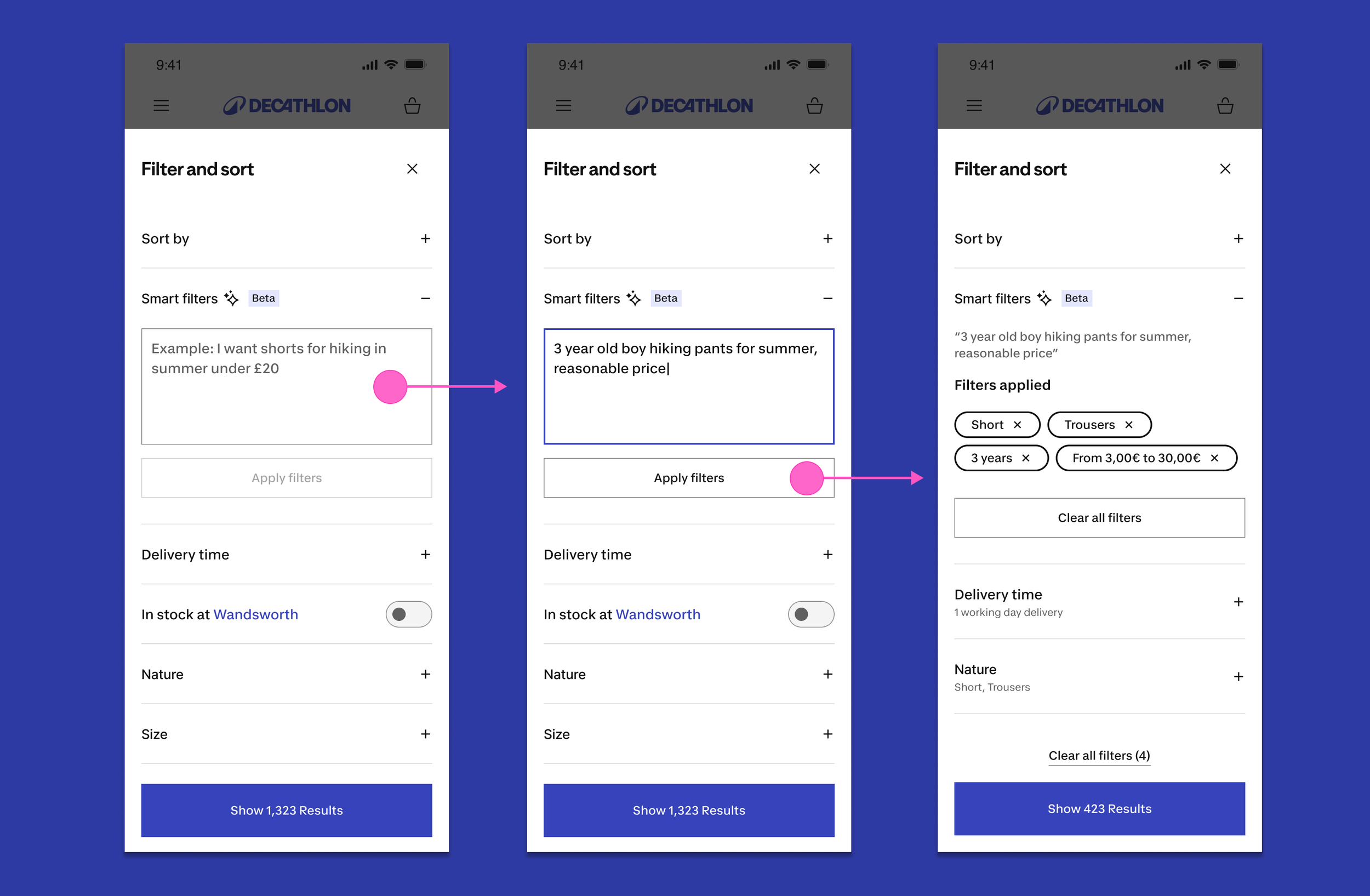
While the user is typing a natural language prompt, the matching filter chips immediately appear below the input field as smart suggestions.
Instant Control
Users see exactly what the AI is thinking in real-time. If the suggestion matches their intent, they keep it. If the AI is wrong, they can instantly dismiss or remove it before it updates the entire page.
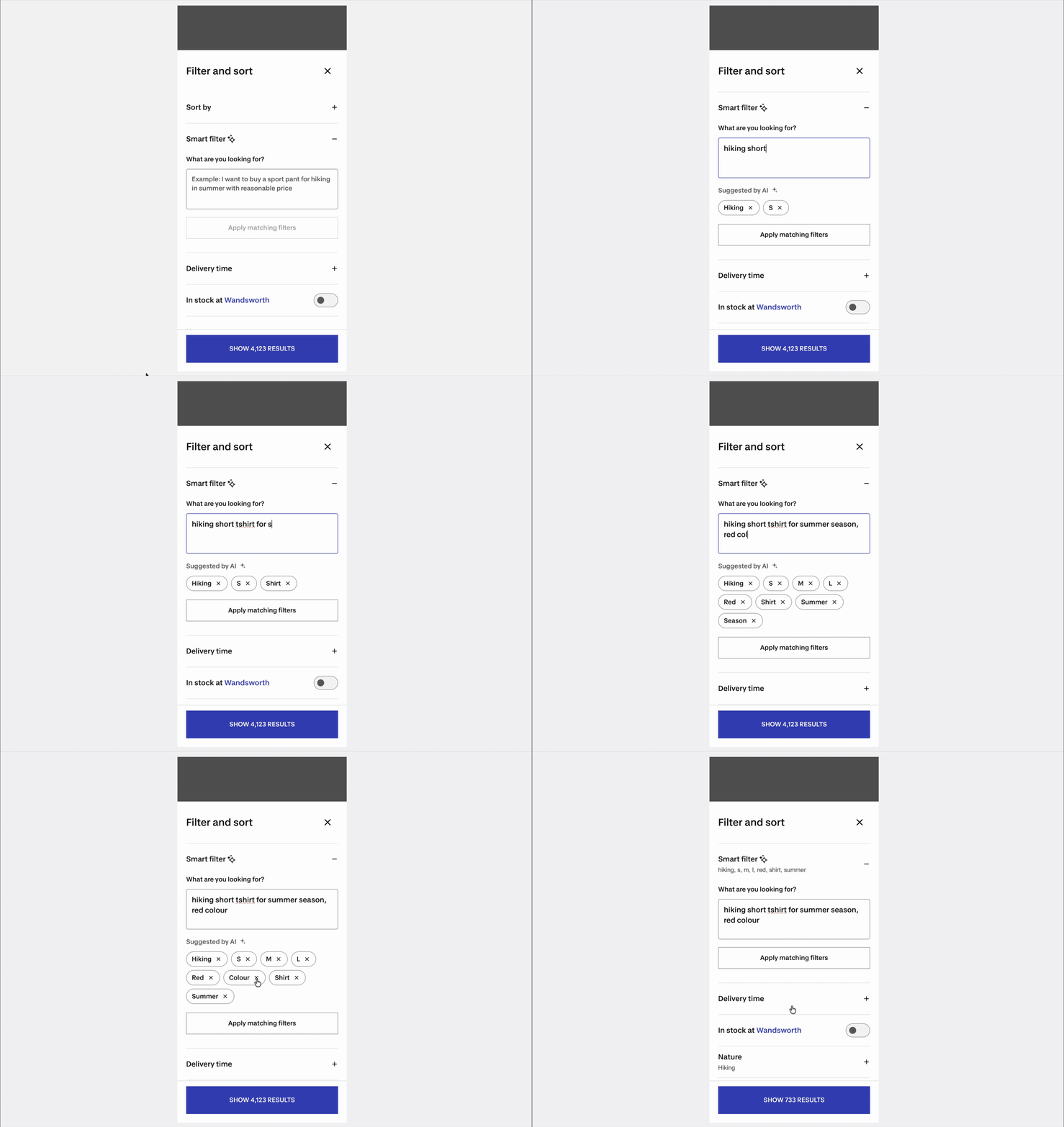
🔻 Challenges in “40% Precision in Action“ Solution
In our refinement meeting, we learned that this sloution led to exponential token usage (Cost ↑) and severe response delays (Latency/Response Time ↑), rendering the system non-viable for a real-time production environment. Therefore, we decided to take it back.
04. MVP Optimization:
Multiple Prompts & Intersection Logic
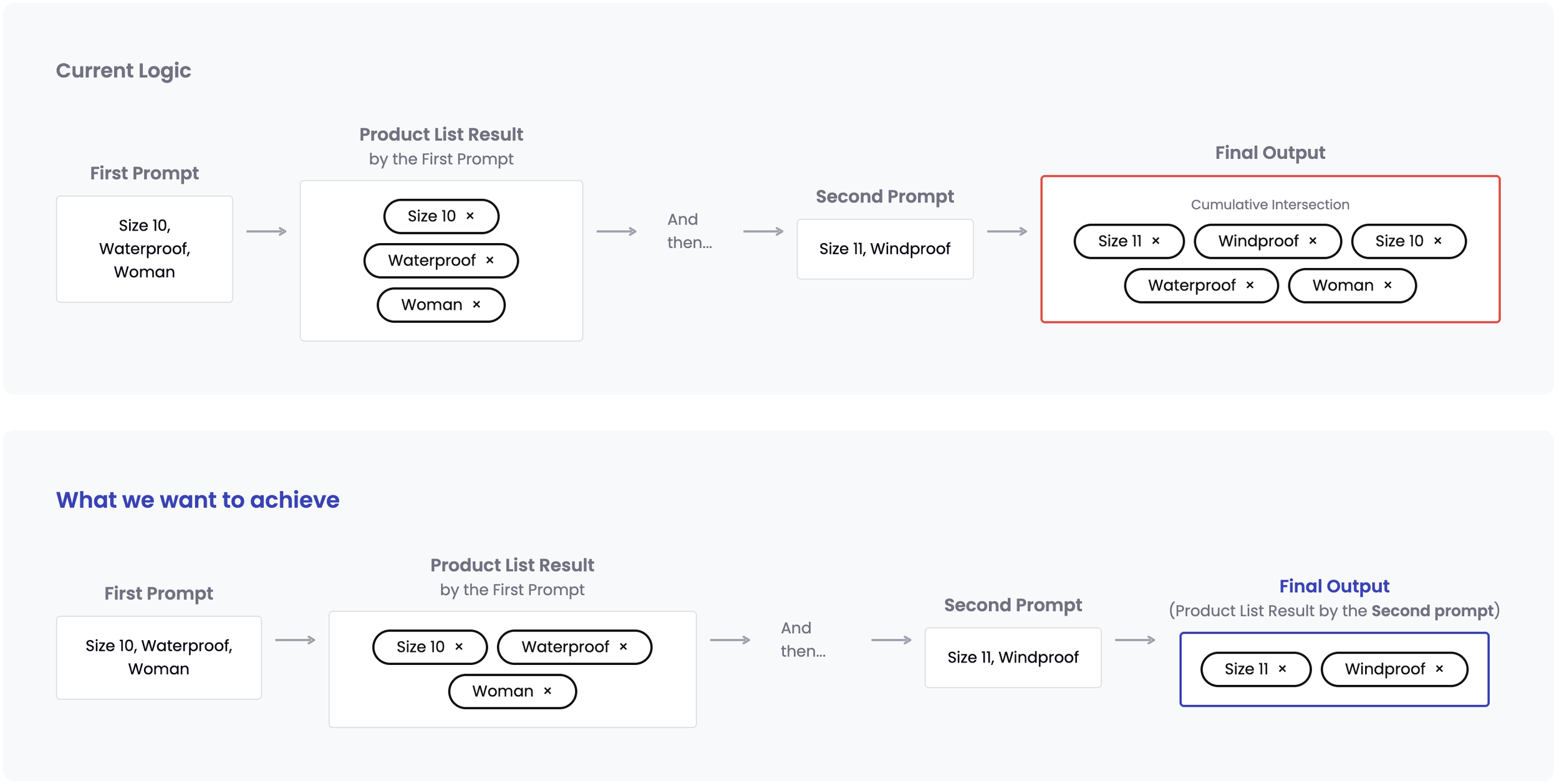
In real-world testing, we found as the edge case that users type multiple short prompts sequentially rather than once.
Managing Filter Intersection: When users typed multiple prompts, the system stacked them together to narrow down the results (e.g., Size 10 + Waterproof + Woman + Size 11 + Windproof). However, this confused users because the filter chips show only applied filters by the latest prompt, making the final results completely unexpected.
The "Clear All" Fix: To keep users from getting stuck in these narrow search tunnels, we redesigned the system to activate a "Clear All" function—either automatically or manually.
05. Final Design & System Architecture
The final solution is decided in the consideration of the technical limits, effective token usage, and response time.
07. What I Learned
"You’re not building an AI product. You’re building a product that solves problems—where AI happens to be a tool”
Leading this project taught me how to balance messy data, technical limits, and business costs to create a smooth user experience.
Focus on the Problem, Not the Tech: Customers don't care about AI; they just want to find their sports gear fast. By designing a gentle, 40% precision suggestion system, we kept users in control and happy even when the AI made mistakes.
Design Affects Speed and Cost: Good design must consider business costs. When our detailed prompts made the app slow and expensive to run, I worked with engineers to break the prompts into smaller, reusable pieces. This proved that smart design can directly save company budget and speed up the app.
08. Next Step
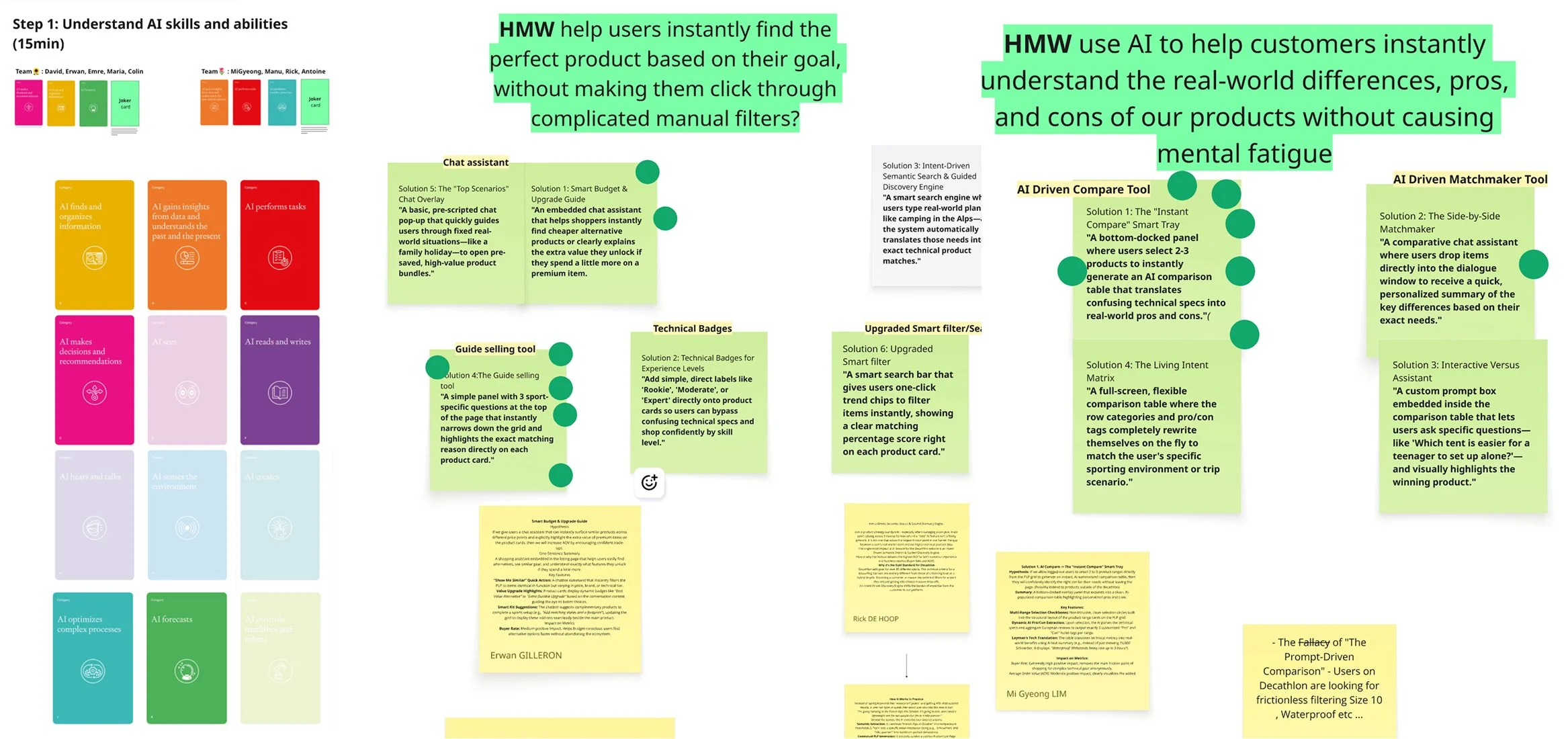
To define our next steps, I facilitated a cross-functional workshop focused on identifying user friction points and ideating AI-driven solutions.
I architected a prioritization framework that guided the team to intentionally target high impact problems that carried low to medium confidence, specifically isolating areas of high ambiguity.
Through this framework, we mapped user pain points, brainstormed “HMW“ statements, and ideated targeted solutions.
As a result of the workshop, we aligned on an 'AI-Driven Comparison Tool,' a high-leverage strategic bet optimized for maximum user value, low implementation cost, and minimal technical dependencies